
Download Prezentt – Interactive Training Course Builder, Free Demo, Secure Cloud Platform
Overview of Prezentt
Prezentt is a cloud‑based training‑content platform designed to make course delivery more interactive, engaging, and cost‑effective. By moving presentations, worksheets, and participant data to a single online hub, trainers can eliminate the hassle of printing, mailing, and manual sign‑in sheets. The service captures every attendee’s details—including substitutions, late arrivals, and feedback—so you always have a complete audit trail. Whether you are a corporate learning manager, a university lecturer, or an independent coach, Prezentt lets you upload Keynote, PowerPoint, or Prezi decks, attach supplementary files, and embed live links that participants can access from any device. The result is a smoother learning experience where trainers focus on content rather than logistics, and learners stay engaged with real‑time interaction tools.
Prezentt’s intuitive dashboard offers a clear overview of upcoming sessions, participant rosters, and resource libraries. The platform also supports custom branding, so you can keep the look and feel consistent with your organization’s visual identity. Security is built in from the ground up; all data is encrypted in transit and at rest, and role‑based permissions ensure that only authorized users can edit or view sensitive materials. For teams that need to stay compliant with data‑privacy regulations, Prezentt provides audit logs and export options for reporting. In short, Prezentt combines the simplicity of a file‑sharing service with the power of a learning‑management system, all while keeping costs low and user experience high.
Key Features That Set Prezentt Apart
- Unified Content Hub: Upload PowerPoint, Keynote, Prezi, PDFs, videos, and hyperlinks in one place.
- Live Participant Tracking: Automatic check‑in, substitution handling, and late‑arrival alerts.
- Interactive Q&A & Polls: Built‑in tools for real‑time questions, polls, and feedback collection.
- Secure Cloud Storage: End‑to‑end encryption, GDPR‑compliant data centers, and role‑based access.
- Custom Branding & White‑Labeling: Add your logo, colors, and domain for a professional look.
- Analytics Dashboard: Visual reports on attendance, engagement scores, and content downloads.
- Multi‑Device Compatibility: Works seamlessly on Windows, macOS, Android, and iOS browsers.
- Integrations: Connect with Zoom, Microsoft Teams, and Slack for hybrid‑learning workflows.
- Version Control: Keep previous iterations of presentations and revert if needed.
- Exportable Certificates: Generate completion certificates automatically after assessments.
Each feature is designed to reduce the administrative overhead that typically plagues training programs. For example, the live participant tracking eliminates the need for manual sign‑in sheets, while the analytics dashboard gives you instant insight into which sections of your course captured the most attention. The integration with popular video‑conferencing tools means you can run hybrid sessions without juggling multiple platforms. Moreover, Prezentt’s version control safeguards your intellectual property, allowing you to experiment with new slides without fear of losing the original content.
Because all resources live in the cloud, updates are pushed instantly to every participant’s device. This eliminates the “old slide deck” problem that many trainers face when a change is made after the session has started. The platform also supports offline access for remote areas with spotty internet—participants can download the necessary files ahead of time and sync their progress once they’re back online. In essence, Prezentt provides a complete toolkit that turns a static slide deck into a dynamic learning experience.
Installation, Usage & Compatibility
How to Get Started
Downloading Prezentt is as simple as clicking the “Get Started” button on the official website. The service is offered as a web‑based application, so there is no heavy client to install on your computer. For users who prefer a native experience, Prezentt also provides lightweight desktop wrappers for Windows and macOS, as well as mobile apps for Android and iOS. Follow these steps to begin:
- Visit www.prezentt.com and click “Sign Up – Free Demo”.
- Enter your email address, create a secure password, and verify your account via the confirmation link.
- Once logged in, download the optional desktop client or mobile app from the “Resources” tab if you want offline capabilities.
- Complete the onboarding wizard, which walks you through creating your first training session, uploading a presentation, and inviting participants.
Using Prezentt in a Live Session
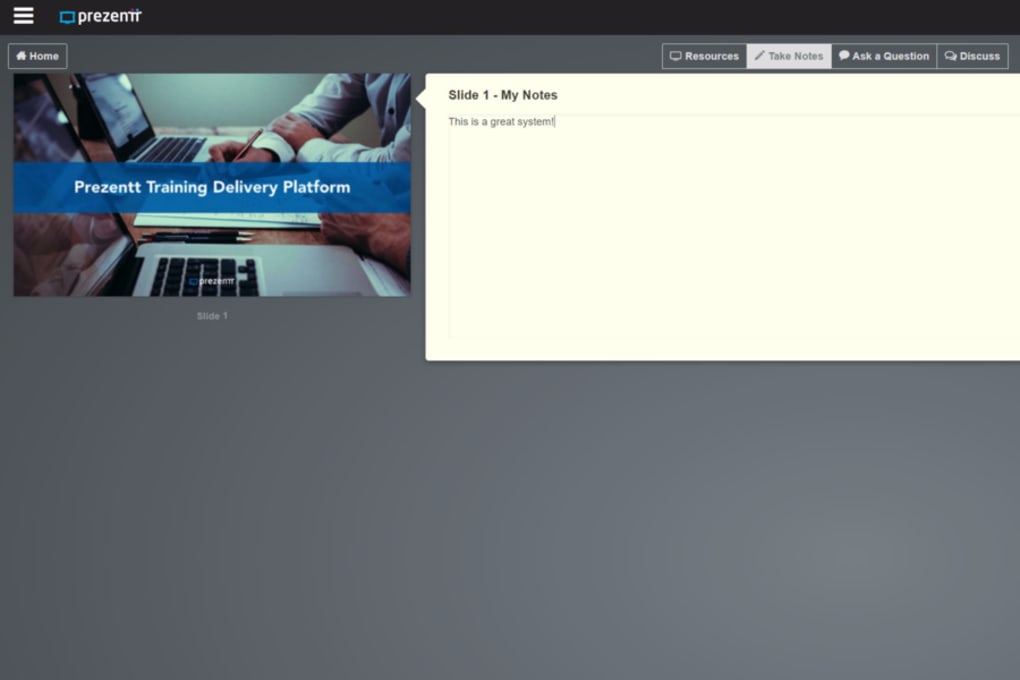
After your content is uploaded, you can schedule a session by selecting a date, time, and time zone. The platform generates a unique join link that you share with learners via email or calendar invite. When the session starts, simply open your uploaded deck from the dashboard, click “Present”, and the interface will sync with any video‑conferencing tool you’re using (Zoom, Teams, etc.). Participants will see the slides in real time, can download supporting files, and can submit questions or poll responses through the side panel. After the session, the system automatically compiles attendance records, engagement metrics, and any uploaded assignments into a downloadable report.
Operating System Support
Prezentt runs on all major operating systems:
- Windows 10 and later (desktop client)
- macOS 11 (Big Sur) and later (desktop client)
- Android 8.0 (Oreo) and later (mobile app)
- iOS 13 and later (mobile app)
- Any modern web browser (Chrome, Edge, Firefox, Safari) on desktop or mobile
The cross‑platform nature ensures that both trainers and learners can join from the device they feel most comfortable with. Updates are rolled out automatically in the cloud, so you always have the latest security patches and feature enhancements without manual intervention.
Pros & Cons – Balanced Look at Prezentt
Pros
- All‑in‑one hub for presentations, files, and participant data.
- Significant cost savings by eliminating printing and physical distribution.
- Real‑time interaction tools (Q&A, polls, chat) boost learner engagement.
- Secure, encrypted cloud storage meets enterprise compliance standards.
- Multi‑device compatibility ensures accessibility for any audience.
- Integrations with popular video‑conferencing platforms simplify hybrid sessions.
- Analytics and reporting provide actionable insights for continuous improvement.
Cons
- Requires reliable internet connectivity for optimal performance.
- Some advanced features (e.g., custom branding) are locked behind higher‑tier plans.
- Learning curve for trainers unfamiliar with cloud‑based content management.
- Limited offline editing; changes must be made while connected to the internet.
Overall, the advantages of Prezentt far outweigh its drawbacks, especially for organizations looking to modernize their training delivery while cutting costs. The few limitations are typical of cloud services and can be mitigated with proper planning and internet infrastructure.
Frequently Asked Questions
Is there a free version of Prezentt?
Yes, Prezentt offers a free demo account with limited storage and basic interaction tools, ideal for trying out the platform before committing to a paid plan.
Can I integrate Prezentt with my existing LMS?
Prezentt provides API endpoints and single‑sign‑on (SSO) support, allowing seamless integration with most major Learning Management Systems.
How secure is the data stored on Prezentt?
All data is encrypted in transit (TLS 1.3) and at rest (AES‑256). The platform also complies with GDPR, HIPAA, and ISO 27001 standards.
What browsers are supported for the web app?
Prezentt works on the latest versions of Chrome, Edge, Firefox, and Safari. Mobile browsers on Android and iOS are also fully supported.
Can I export attendance and engagement reports?
Yes, after each session you can download CSV or PDF reports that include attendance, poll results, and participant feedback.
Conclusion – Ready to Transform Your Training?
Prezentt delivers a modern, secure, and highly interactive environment for creating and delivering training programs. By consolidating presentations, participant data, and engagement tools into a single cloud platform, it eliminates the inefficiencies of traditional classroom logistics while keeping costs low. Whether you are a corporate trainer, an academic instructor, or a freelance coach, the combination of robust features, cross‑device compatibility, and strong security makes Prezentt a compelling choice for today’s digital learning landscape. Download Prezentt today to experience a smoother, more engaging training workflow and start saving both time and money.



.png)



